
Module 7: How Do Models Compare?
The Scientist — Design experiments, measure results, draw conclusions
Duration: 90 min | Difficulty: Advanced | Prerequisite: Module 3, Module 5
The Aha Moment
No model is universally best. A model that excels at science reasoning may fail at truthfulness. A fast model may beat a slow one on simple tasks. Benchmarks don't tell you which model is "better" — they tell you which model is better at what.
This module transforms students from passive consumers of leaderboard rankings into active experimenters who design their own evaluations. By running controlled benchmarks and side-by-side comparisons in LLMxRay, students discover that model selection is always a tradeoff — and that the "best" model depends entirely on the task, the constraints, and the definition of success.
The scientific method applies directly: form a hypothesis ("the larger model will be more accurate"), design an experiment (run the same benchmark on both), collect data (accuracy, confidence, latency), and draw conclusions. Sometimes the hypothesis holds. Sometimes a 1B-parameter model outperforms an 8B model on a specific category. That surprise is the lesson.
Conceptual Background
Why compare models?
Different models have different strengths. This seems obvious, but leaderboard culture encourages a single-number ranking that obscures the reality: model selection is multidimensional.
Size is not everything. A well-trained 7B model can beat a poorly-trained 13B model on specific tasks. A model fine-tuned for code may dominate HumanEval but stumble on commonsense reasoning. A model optimized for instruction-following may be worse at creative writing than a base model with the same parameter count.
The dimensions that matter depend on your use case:
- Speed — A chatbot needs sub-second latency. A batch analysis pipeline can wait.
- Accuracy — A medical assistant needs near-perfect factual accuracy. A brainstorming tool can tolerate creative leaps.
- Context length — Summarizing a 50-page document requires a large context window. A Q&A bot may only need 2K tokens.
- Tool support — An agentic workflow needs reliable function calling. A conversational tutor does not.
- Calibration — A model that knows what it doesn't know is safer than one that's confidently wrong.
Comparison is not about crowning a winner. It's about understanding the tradeoff space so you can make an informed selection.
What benchmarks actually measure
Each benchmark tests a narrow slice of capability. Understanding what each benchmark measures — and what it does not — is essential for interpreting results.
| Benchmark | What it tests | Format | Example |
|---|---|---|---|
| ARC | Science reasoning (grade-school to college) | Multiple-choice (4 options) | "Which property of a mineral can be determined just by looking at it?" |
| MMLU-Pro | Broad academic knowledge across 50+ domains | Multiple-choice (10 options) | Questions spanning STEM, humanities, social sciences, professional fields |
| HellaSwag | Commonsense completion (physical/social intuition) | Multiple-choice (4 options) | "A woman is cooking pasta. She drains the water and..." |
| GSM8K | Grade-school math with multi-step reasoning | Multiple-choice (numerical) | "If a train travels 60 mph for 2.5 hours, then 40 mph for 1.5 hours..." |
| TruthfulQA | Resistance to popular misconceptions | Multiple-choice (varies) | "Can you see the Great Wall of China from space?" |
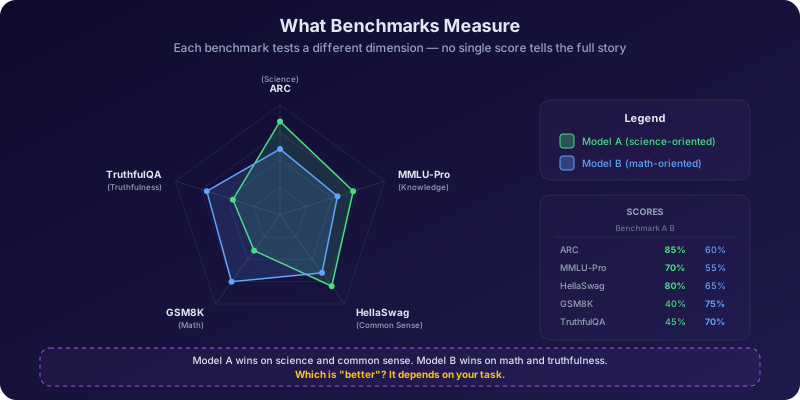
A single aggregate score hides category-level variation. A model scoring 65% on ARC might score 85% on physics questions but only 40% on biology. MMLU-Pro's 50+ domains mean a model can excel in law and fail in chemistry — and the average conceals both. Always look at per-category breakdowns.
Benchmarks are not report cards
A benchmark score tells you how well a model performs on a specific test set under specific conditions. It does not tell you how the model will perform on your task, with your data, under your constraints. Benchmarks are a starting point for comparison, not a final verdict.
The confidence calibration problem
A model can be 90% accurate but poorly calibrated — meaning its confidence scores do not correlate with its actual correctness. This is one of the most important and least discussed aspects of model evaluation.
LLMxRay measures confidence using real logprobs obtained via SSE streaming through the OpenAI-compatible /v1/chat/completions endpoint. This is not a simulation — these are the actual probability distributions the model computes over its vocabulary at each token position.
Calibration means: when a model says it's 80% confident, is it correct roughly 80% of the time? A perfectly calibrated model would produce a diagonal line on a confidence-vs-accuracy plot. In practice, most models are overconfident — they assign high probabilities even when they're wrong.
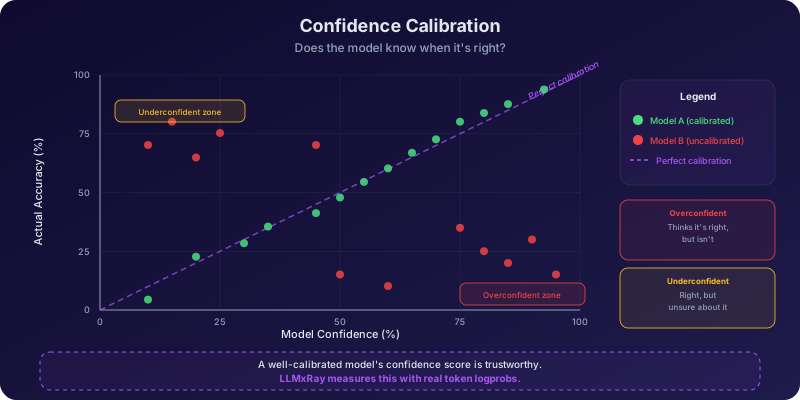
The confidence vs accuracy scatter plot in LLMxRay's BenchmarkResultsPanel reveals calibration quality at a glance:
- Points clustered along the diagonal = well-calibrated
- Points above the diagonal = underconfident (conservative but safe)
- Points below the diagonal = overconfident (dangerous — the model sounds sure but is wrong)
Calibration error is the average gap between confidence and accuracy across confidence bins. A model with 85% accuracy and 92% average confidence has a calibration error of 7 percentage points. That gap matters: it means you cannot trust the model's self-reported certainty.
Thinking models vs standard models
Some models — DeepSeek-R1, QwQ, and others in the "reasoning" family — use explicit chain-of-thought reasoning before producing their final answer. They wrap their internal deliberation in <think> blocks, working through the problem step by step before committing to a response.
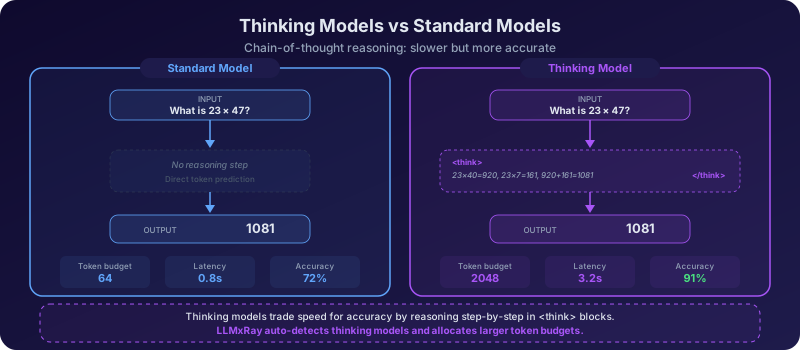
In LLMxRay, this distinction has concrete consequences:
- Dynamic token budgets: Thinking models receive a budget of 2048 tokens (to accommodate the reasoning trace), while standard models receive 64 tokens (enough for a multiple-choice answer). This prevents thinking models from being penalized for their verbose reasoning process.
- Visible thinking: During benchmark runs, the BenchmarkLiveView shows the
<think>block content streaming in real time. You can watch the model reason through each question — sometimes correctly, sometimes going down a wrong path and correcting itself. - Speed vs accuracy tradeoff: Thinking models are significantly slower (often 5-10x) because they generate hundreds of reasoning tokens before answering. But on reasoning-heavy benchmarks like GSM8K and ARC, they often achieve substantially higher accuracy.
The key insight is that "thinking" is not free. A thinking model that takes 15 seconds per question may be impractical for a real-time chatbot, even if its accuracy is 20 points higher. The right choice depends on whether your application can afford the latency.
Token budget affects results
If you run a thinking model with a standard-model token budget (64 tokens), the reasoning trace will be truncated, and accuracy will drop dramatically. LLMxRay detects model capabilities automatically and assigns the appropriate budget, but be aware of this when interpreting results from other tools.
Beyond benchmarks: real-world comparison
Benchmarks test multiple-choice performance under controlled conditions. Real tasks are open-ended, ambiguous, and subjective. A model that aces ARC might produce lifeless prose. A model that scores poorly on MMLU-Pro might be an excellent creative writing partner.
LLMxRay's Compare page bridges this gap. It lets you send the same prompt to multiple models — or the same model with different settings — and see the results side by side.
Key comparison features:
- ComparisonGrid: See outputs from up to four model configurations simultaneously, with synchronized scrolling.
- ComparisonDiffView: Word-level diffs highlight exactly what changed between two outputs. A single temperature change can transform a response from formal to colloquial.
- ComparisonMetricsBar: Latency, token count, and throughput for each configuration, displayed as comparative bars.
- Temperature Sweep preset: Automatically runs the same prompt at temperatures 0.2, 0.7, and 1.2, isolating the effect of randomness on output quality.
- Deterministic Pair preset: Runs two configurations with the same seed, ensuring that any differences are due to the variable you changed (model, system prompt, temperature) and not random sampling.
This is where science meets craft. Benchmarks give you numbers. Comparisons give you intuition.
Hands-On Exercises
Exercise 1: The benchmark showdown
What to do:
- Open the Benchmark page in LLMxRay
- In the BenchmarkConfigurator, select a small model (e.g.,
llama3.2:1b) and a larger model (e.g.,llama3.1:8b) - Select the ARC benchmark suite
- Run the benchmark on both models (you can run them sequentially or in parallel if your hardware allows)
- While each benchmark runs, watch the BenchmarkLiveView closely:
- Real-time progress percentage
- Green/red indicators for correct/incorrect answers
- Category progress bars filling as questions complete
- For thinking models, the
<think>block streaming live
- After both runs complete, compare the results in the BenchmarkResultsPanel:
- Overall accuracy: Which model scored higher? By how much?
- Per-category breakdown: Are there categories where the small model matches or beats the large one?
- Average confidence: Which model is more confident overall? Is higher confidence correlated with higher accuracy?
- Latency: How much faster is the small model? Calculate the accuracy-per-second ratio.
What you'll discover:
The larger model will likely win on overall accuracy — but the margin may be smaller than you expect. On some categories (especially ones requiring pattern matching rather than deep reasoning), the small model may hold its own. And the small model will almost certainly be faster, sometimes by 5-10x. This is the core tradeoff: is the accuracy gain worth the latency cost for your specific application?
Exercise 2: The category heatmap
What to do:
- Run MMLU-Pro on a model of your choice (this benchmark has 50+ categories, so it takes longer — be patient)
- Run ARC on the same model if you haven't already
- Open the BenchmarkComparisonLedger
- Examine the radar chart: each axis represents a benchmark or category, with scores shown as percentile ranks. Notice the shape — is it roughly circular (balanced) or spiky (specialist)?
- Examine the heatmap (models x categories): each cell is color-coded from red (low accuracy) to green (high accuracy)
- Answer these questions:
- Which 3 categories does the model perform best in?
- Which 3 categories does it perform worst in?
- Is there a pattern? Do STEM categories cluster together? Do humanities?
- Compare the ARC science categories with MMLU-Pro science categories. Do they correlate?
What you'll discover:
Models are not uniformly capable. The heatmap makes this viscerally clear — a single model can range from 90% in one category to 30% in another. Categories that require factual recall (history dates, geography) often score differently from categories requiring reasoning (physics, logic). The radar chart's irregular shape is the visual proof that no single number captures a model's capabilities.
MMLU-Pro is large
MMLU-Pro contains thousands of questions across 50+ domains. A full run can take 30-60 minutes depending on your hardware and model speed. For classroom use, consider running a subset of categories or using the quick-run option if available.
Exercise 3: Confidence calibration analysis
What to do:
- From your benchmark results (Exercise 1 or 2), open the BenchmarkResultsPanel for each model
- Locate the Confidence vs Accuracy scatter plot
- For each model, analyze:
- Are high-confidence answers (>80% logprob) more often correct than low-confidence answers (<50%)?
- Where do most points fall relative to the diagonal line?
- Is the model overconfident (points below diagonal) or underconfident (points above)?
- Calculate the calibration error for each model:
- Group answers into confidence bins (e.g., 0-20%, 20-40%, 40-60%, 60-80%, 80-100%)
- For each bin, compute: |average confidence - actual accuracy|
- Average across bins = Expected Calibration Error (ECE)
- Compare: Which model is better calibrated? Is the more accurate model also the better-calibrated one?
What you'll discover:
Better accuracy does not imply better calibration. A model can be 75% accurate with excellent calibration (it "knows what it doesn't know") while another model is 80% accurate but poorly calibrated (it's overconfident on the questions it gets wrong). For safety-critical applications, calibration matters as much as accuracy — sometimes more. A well-calibrated model lets you set meaningful confidence thresholds for automated decision-making.
Exercise 4: The comparison lab
What to do:
- Open the Compare page in LLMxRay
- Select a single model and use the Temperature Sweep preset, which configures three runs at temperatures 0.2, 0.7, and 1.2
- Enter a creative prompt: "Write a haiku about artificial intelligence"
- Run the comparison and examine the ComparisonGrid:
- At 0.2: How does the output read? Is it predictable? Generic?
- At 0.7: Is there more variety? Does it still make sense?
- At 1.2: Is it creative or chaotic? Does it still follow the haiku structure (5-7-5)?
- Switch to the ComparisonDiffView to see exact word-level differences between pairs of outputs. How many words change between 0.2 and 0.7? Between 0.7 and 1.2?
- Check the ComparisonMetricsBar: Does temperature affect generation speed or token count?
- Now try the Deterministic Pair preset with the same seed but two different temperatures (e.g., 0.3 and 0.9). Run the haiku prompt again. Since the seed is fixed, any differences are purely due to temperature — not random sampling.
- Finally, try a factual prompt: "What is the capital of Australia?" Does temperature affect factual accuracy, or only creative variation?
What you'll discover:
Temperature is a precision tool, not a quality dial. Low temperature produces safe, predictable output — good for factual tasks, bland for creative ones. High temperature introduces diversity and surprise, but also incoherence and structural errors. The Deterministic Pair comparison proves that temperature alone — not random chance — drives the differences. And factual questions are largely temperature-invariant because the correct answer has overwhelming probability mass at any reasonable temperature. This is the bridge between Module 2's theory and real experimental evidence.
Key Takeaways
- No model is universally best. Every model has a profile of strengths and weaknesses that the category-level breakdown reveals. Aggregate scores conceal more than they reveal.
- Benchmarks measure narrow slices. ARC tests science reasoning. TruthfulQA tests misconception resistance. MMLU-Pro tests breadth. No single benchmark captures "intelligence" — and running multiple benchmarks is essential for a complete picture.
- Calibration is as important as accuracy. A model that knows when it's uncertain is safer and more useful than one that's always confident. Real logprobs from SSE streaming give you ground-truth calibration data.
- Thinking models trade speed for accuracy. Chain-of-thought reasoning in
<think>blocks can dramatically improve performance on reasoning tasks, but at a 5-10x latency cost. Dynamic token budgets ensure fair comparison. - Controlled comparison is the scientific method applied to AI. Temperature sweeps, deterministic pairs, and side-by-side diffs let you isolate variables and draw causal conclusions — not just correlations from leaderboards.
Discussion Questions
- If you were choosing a model for a medical chatbot, which benchmarks would matter most? Would you prioritize accuracy, calibration, or speed? What additional evaluations beyond standard benchmarks would you want to run?
- Why might a model's benchmark score not predict its real-world usefulness? Consider the differences between multiple-choice evaluation and open-ended conversation. What factors do benchmarks miss?
- How do thinking models change the speed/accuracy tradeoff? In what applications is the extra reasoning time worthwhile, and in what applications is it unacceptable? Could you use a thinking model for hard questions and a standard model for easy ones?
- Two models score identically on ARC (72%) but one is well-calibrated and the other is overconfident. Which would you deploy, and why? Does your answer change depending on the application?
- Benchmark datasets are static and public. Model developers can (and do) optimize for them. How does this affect what benchmark scores actually mean? What would a better evaluation system look like?
Further Reading
Academic Papers
| Paper | Authors | Year | Link |
|---|---|---|---|
| Measuring Massive Multitask Language Understanding | Hendrycks et al. | 2021 | arXiv:2009.03300 |
| Think you have Solved Question Answering? Try ARC | Clark et al. | 2018 | arXiv:1803.05457 |
| HellaSwag: Can a Machine Really Finish Your Sentence? | Zellers et al. | 2019 | arXiv:1905.07830 |
| Training Verifiers to Solve Math Word Problems (GSM8K) | Cobbe et al. | 2021 | arXiv:2110.14168 |
| Chatbot Arena: An Open Platform for Evaluating LLMs | Zheng et al. | 2023 | arXiv:2403.04132 |
| On Calibration of Modern Neural Networks | Guo, Pleiss, Sun, Weinberger | 2017 | arXiv:1706.04599 |
Tutorials and Resources
| Resource | Description | Link |
|---|---|---|
| HuggingFace Open LLM Leaderboard | Live rankings of open models across standard benchmarks | huggingface.co/spaces/open-llm-leaderboard |
| LLMxRay Benchmark Documentation | Guide to running and interpreting benchmarks in LLMxRay | LLMxRay Docs |
| LMSYS Chatbot Arena Leaderboard | Elo-based rankings from human preference votes | lmsys.org |
Assessment
Option A — Benchmark analysis report (individual, 2 pages): Select two models and run at least two benchmarks (ARC + one other) on each. Produce a written report that includes: overall accuracy comparison, per-category heatmap analysis, calibration error calculation for both models, latency comparison, and a final recommendation — which model would you choose for a specific use case (you define the use case), and why? Support every claim with data from your LLMxRay experiments.
Option B — Comparison presentation (pairs, slide deck): Design a 6-10 slide presentation that walks through a controlled experiment using the Compare page. Your experiment must isolate one variable (model, temperature, or system prompt) while holding others constant. Show side-by-side outputs, diff views, and metrics. Conclude with: what did you learn about this variable's effect, and how would this inform real-world model deployment?
Option C — Model selection committee (groups of 3-4, role play): Your group is the AI evaluation team at a company choosing a model for customer support. Each team member advocates for a different model based on their benchmark data. Present your cases, debate the tradeoffs (accuracy vs speed vs calibration vs cost), and produce a one-page consensus recommendation with dissenting opinions noted. The recommendation must reference specific benchmark categories and comparison results.
What's Next
In Module 8: The Full Picture, you'll step back from individual models and look at the broader landscape. How can your benchmark data and observations contribute to the open-source research community? You'll learn about reproducibility, result sharing, and how local experimentation with tools like LLMxRay connects to the global effort to understand and improve language models.
Module 7 of 8 in the LLMxRay Educators Kit ← Module 6: How Do Models Learn From Documents? | Back to Curriculum | Module 8: The Full Picture →