
Module 6: Can AI Use Tools?
The Engineer — Build bridges between language and action
Duration: 60 min | Difficulty: Intermediate | Prerequisite: Module 1, Module 5
The Aha Moment
Tool calling is pattern matching, not understanding. The model doesn't know what an API does — it matches your request to a function signature and generates JSON arguments. It's the same next-token prediction, just aimed at structured output.
When a model "uses a calculator" or "checks the weather," it feels like intelligence in action — a mind that recognizes its own limitations and reaches for the right instrument. The reality is far more mechanical. The model receives tool definitions as part of its prompt — JSON schemas describing function names, parameter types, and natural-language descriptions. When your request patterns-matches against one of those descriptions, the model's next-token prediction shifts from generating prose to generating a structured tool_call JSON object. It has no concept of what the function does, no mental model of HTTP requests or databases. It is filling in a template.
This distinction matters enormously. Understanding that tool calling is structured generation — not agency — allows students to reason about why tools sometimes fail, why descriptions must be precise, and why giving a model access to a dangerous tool is fundamentally a permissions design problem, not an intelligence problem. The model will call whatever tool best matches the pattern, regardless of consequences.
Conceptual Background
What is tool calling?
When a language model generates a response, it normally produces natural language — sentences, paragraphs, explanations. Tool calling is a mode where the model instead generates a structured JSON object: a function name plus a set of typed arguments. This object is not executed by the model. It is returned to the application, which runs the actual function, collects the result, and feeds that result back into the conversation for the model to incorporate into its final answer.
The model never "runs" anything itself. It has no runtime, no interpreter, no access to the network or filesystem. It is a text generator that has been trained to produce a specific JSON format when the context suggests a tool should be invoked. The application layer — in this case, LLMxRay — is what bridges the gap between the model's structured output and real-world execution.
This is a critical architectural boundary. The model proposes; the application disposes. Every tool call passes through application code that can validate, sandbox, rate-limit, or reject it before execution. This separation is what makes tool calling safe (when designed correctly) or dangerous (when the application blindly trusts the model's output).
The tool calling loop
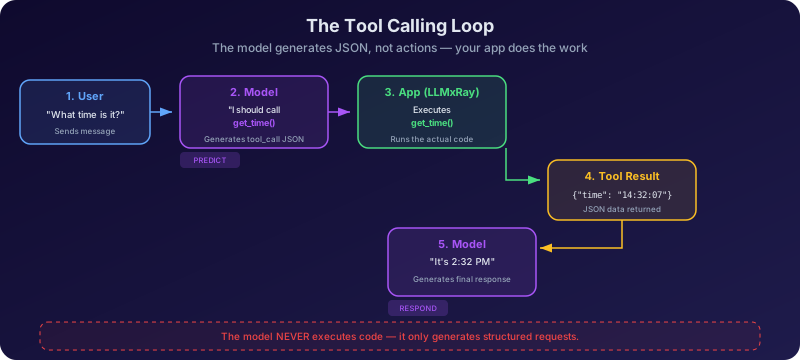
The full lifecycle of a tool-augmented conversation follows a strict loop:
- User message — You ask a question or make a request ("What time is it in Tokyo?")
- Model decides to call a tool — Based on the tool definitions in its context, the model generates a
tool_callobject instead of a text response (e.g.,{"name": "current_time", "arguments": {"timezone": "Asia/Tokyo"}}) - Application executes the tool — LLMxRay receives the tool call, runs the corresponding function in a sandboxed environment, and captures the result
- Result fed back — The tool's output is appended to the conversation as a
toolrole message - Model generates final response — With the tool result now in context, the model produces a natural-language answer ("The current time in Tokyo is 2:34 PM JST")
This loop can repeat. If the model determines that it needs additional information after seeing the first tool's result, it can issue another tool call. LLMxRay supports up to 5 rounds of tool calls per turn, enabling multi-step reasoning chains where each tool's output informs the next call.
How the model "decides" to call a tool
It doesn't decide — it predicts. This distinction is the conceptual core of this module.
When tool calling is enabled, the tool definitions are injected into the model's prompt as JSON schemas — typically in the system message or a dedicated tools block. These definitions become part of the context that the model reads before generating its next tokens. The model has been fine-tuned (during its training) to recognize when a user's request aligns with one of the available tool descriptions and to produce a tool_call object in those cases.
This is why good descriptions matter. The description field in a tool definition is the model's only guide to what the tool does. The model cannot inspect the tool's source code. It cannot test the tool. It reads the description — a few sentences of natural language — and decides (predicts) whether the current request matches. A vague description leads to missed calls or wrong calls. A precise description leads to reliable invocation.
Consider two descriptions for the same tool:
- Good: "Get the current weather conditions for a given city, returning temperature in Celsius and a short description"
- Bad: "A utility function"
The first gives the model enough signal to match "What's the weather in Lyon?" to this tool. The second gives it almost nothing — the model might ignore the tool entirely, or worse, call it for unrelated requests because it can't tell what it does.
Tool definitions: the contract
A tool definition is a JSON schema that serves as a contract between the model and the application. It has three essential parts:
name— A unique identifier for the function (e.g.,weather_check,calculate,generate_uuid). This is what appears in the model'stool_calloutput.description— A natural-language explanation of what the tool does and when to use it. This is the single most important field — it is what the model reads to determine relevance.parameters— A JSON Schema object defining the arguments the function accepts, including their types (string,number,boolean,array,object), descriptions, and which arerequired.
Here is an example of a well-structured tool definition:
{
  "type": "function",
  "function": {
    "name": "weather_check",
    "description": "Get the current weather conditions for a given city. Returns temperature in Celsius, humidity, and a short description of conditions.",
    "parameters": {
      "type": "object",
      "properties": {
        "city": {
          "type": "string",
          "description": "The name of the city to check weather for"
        },
        "units": {
          "type": "string",
          "enum": ["celsius", "fahrenheit"],
          "description": "Temperature unit (default: celsius)"
        }
      },
      "required": ["city"]
    }
  }
}
This is an OpenAI-compatible format, which is the standard that Ollama and LLMxRay follow. The parameters block is itself a JSON Schema — the same format used to validate web forms and API requests across the software industry. Students who learn to read tool definitions here are learning a transferable skill.
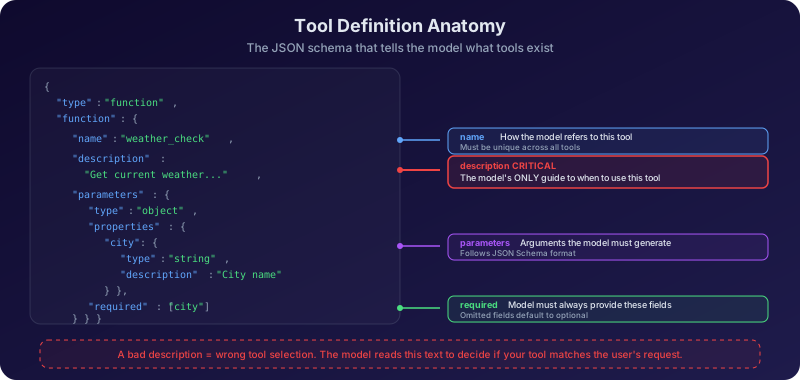
In LLMxRay's Tool Workshop, you can see this schema rendered visually. The Schema tab shows the auto-generated JSON Schema for any tool you create, and the Code Panel shows the executable implementation with bidirectional sync — edit the code and the schema updates, edit the schema and the code follows.
When tool calling fails
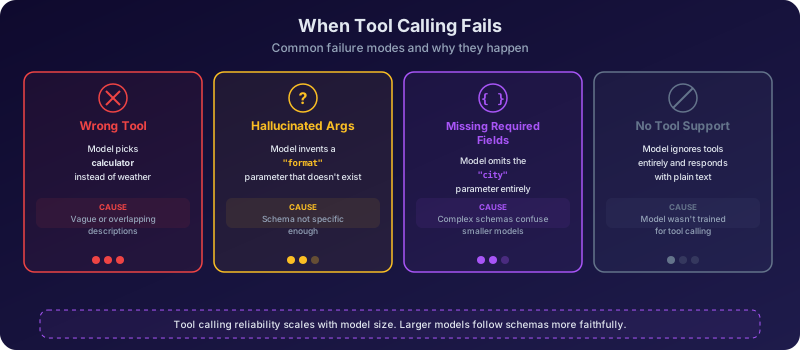
Tool calling can fail in several ways, and understanding these failure modes is essential for building reliable systems:
- Wrong tool selected — The model calls
calculatewhen you asked for the time. This usually means the descriptions are ambiguous or overlapping. If two tools have similar descriptions, the model may pattern-match to the wrong one. - Hallucinated arguments — The model invents parameter values that don't match the schema. For example, passing
{"location": "Paris"}when the parameter is namedcity. This is the same hallucination behavior from Module 3, but applied to structured output. - Missing required fields — The model generates a tool call but omits a required parameter. The application should validate against the schema and return an error, giving the model a chance to retry.
- Model doesn't support tools — Not all models can do tool calling. Smaller models or older architectures may not have been fine-tuned for structured output. They might ignore tool definitions entirely or produce malformed JSON.
- Tool returns an error — The function executes but fails (network timeout, invalid input, rate limit). The model receives the error message and must decide how to proceed — retry, apologize, or try a different approach.
Not all models support tool calling
LLMxRay auto-detects whether a model supports tool calling by checking its capabilities during model loading. If a model doesn't support tools, the tool toggles in Chat Settings will be disabled. Smaller models (under 7B parameters) often lack tool calling ability. Always verify support before designing exercises around specific models.
Hands-On Exercises
Exercise 1: Your first tool
What to do:
- Open the Tool Workshop in LLMxRay
- Browse the Tool Templates — select "Current Time" from the Utility templates
- Examine the tool in three views:
- The tool definition panel: note the
name,description, andparameters - The Code Panel: read the JavaScript implementation — this is what actually runs when the tool is called
- The Schema tab: see the auto-generated JSON Schema that gets sent to the model
- The tool definition panel: note the
- Notice the visual node-based canvas — the tool appears as a connected node showing inputs, processing, and outputs
- Now go to Chat and open Chat Settings. Find the tool toggles and enable "Current Time"
- Ask the model: "What time is it?"
- Watch the response — the model should generate a
tool_callinstead of guessing the time - Navigate to the Session page and open the Tools tab. Find the tool call in the ToolCallTimeline and examine it
What you'll discover:
The model doesn't know the current time — it's a language model, not a clock. But with the tool enabled, it recognizes that your question matches the tool's description and generates a structured call. The application executes the function, gets the real time, and feeds it back. The model then incorporates the actual time into a natural-language response.
Exercise 2: The description experiment
What to do:
- In the Tool Workshop, create a new custom tool from scratch:
- Name:
weather_check - Description: "Get the current weather for a location"
- Parameters: one required parameter
cityof typestring
- Name:
- Use the Probe & Pick workflow to test the schema — verify the Schema tab shows the correct JSON Schema
- Go to Chat, enable the tool in Chat Settings, and ask: "What's the weather in Paris?"
- The model should call
weather_checkwith{"city": "Paris"} - Now go back to the Tool Workshop and edit the description to something vague: "A function"
- Return to Chat (start a new conversation) and ask the same question. Does the model still call the tool?
- Edit the description one more time — delete it entirely (leave it blank)
- Ask again. What happens now?
What you'll discover:
With a clear description, the model reliably matches your request to the tool. With a vague description, it may still call the tool (if it's the only one available) but with less confidence. With no description at all, behavior becomes unpredictable — some models will ignore the tool, others will call it randomly. This proves that the description is not metadata for humans — it is the primary signal the model uses to decide relevance.
Exercise 3: Tool call anatomy
What to do:
- After completing Exercises 1 and 2, open the Session page and find a conversation that contains tool calls
- Open the Tools tab to see the ToolCallTimeline — a chronological view of every tool invocation in the session
- Click on a ToolCallCard to expand it. Examine:
- Function name — Which tool did the model call?
- Arguments — What JSON arguments did the model generate? Are they valid against the schema?
- Execution status — Did the tool succeed or fail?
- Duration — How long did execution take (in milliseconds)?
- Result — What data came back from the tool?
- Now read the model's final response that followed this tool call
- Compare: Was the model's natural-language response faithful to the tool result? Did it add information that wasn't in the result? Did it omit anything?
What you'll discover:
The ToolCallCard gives you complete transparency into the tool calling loop. You can see exactly what the model requested, what it received, and how it used that information. Sometimes the model is perfectly faithful to the result. Other times, it paraphrases, adds hedging language ("Based on the data..."), or even supplements the tool result with its own knowledge — which may or may not be accurate.
Exercise 4: Multi-tool orchestration
What to do:
- Enable 3 or more tools in Chat Settings — for example: Current Time, Calculator, and UUID Generator
- Ask a compound question that requires all three: "Generate a UUID, then tell me the current time, then calculate 42 * 17."
- Watch the model's response carefully:
- Does it call all three tools?
- Does it call them in the order you specified?
- Does it try to call them all at once (parallel) or one at a time (sequential)?
- Check the ToolCallTimeline on the Session page to see the exact sequence and timing
- Now try a more ambiguous request: "I need a unique identifier and some math — what's 256 divided by 8?"
- Does the model call the UUID generator even though you said "unique identifier" not "UUID"?
- Does it use the calculator or answer the math from its own knowledge?
What you'll discover:
Multi-tool orchestration reveals how the model prioritizes and sequences calls. Some models will call all tools in parallel; others will chain them sequentially. The order may not match your request — the model generates what it predicts should come next, not what you asked for first. Ambiguous phrasing tests whether the model can map informal language ("unique identifier") to formal tool names (generate_uuid). This is pattern matching at work — and it doesn't always match the way you expect.
Key Takeaways
- Tool calling is structured generation, not intelligence. The model produces a JSON object matching a schema — it does not understand what the function does or how it works.
- The description field is everything. It is the only signal the model uses to decide when and whether to call a tool. Vague descriptions lead to unreliable behavior.
- The model proposes, the application disposes. Every tool call passes through application code that can validate, execute, or reject it. Safety depends on this separation.
- Multi-tool orchestration is pattern-dependent. The model may call tools in unexpected orders, skip tools, or call the wrong one when descriptions overlap. Test thoroughly.
- Not all models can use tools. Tool calling requires specific fine-tuning. LLMxRay auto-detects support so you don't have to guess.
Discussion Questions
- If tool calling is just pattern matching, what prevents the model from calling a dangerous tool — say, one that deletes files or sends emails? How should we design tool permissions in a production system?
- What happens if a tool returns an error — does the model handle it gracefully? Should the application hide errors from the model or show them? What are the tradeoffs?
- The model selects tools based on descriptions written by humans. What happens if the description is misleading — intentionally or accidentally? Could this be exploited?
- Some tool calling systems allow the model to write arbitrary code (like a Python interpreter tool). Does this cross the line from "structured output" to "agency"? Where should the boundary be?
- If two tools have overlapping descriptions (e.g., "search the web" and "look up information online"), how does the model choose between them? What does this tell us about the limits of description-based routing?
Further Reading
Academic Papers
| Paper | Authors | Year | Link |
|---|---|---|---|
| Toolformer: Language Models Can Teach Themselves to Use Tools | Schick et al. | 2023 | arXiv:2302.04761 |
| Gorilla: Large Language Model Connected with Massive APIs | Patil et al. | 2023 | arXiv:2305.15334 |
| ToolBench: An Open Platform for Training, Serving, and Evaluating LLM Tool Learning | Qin et al. | 2023 | arXiv:2305.16504 |
| Function Calling and Tool Use | OpenAI | 2023 | platform.openai.com/docs |
Tutorials and Explanations
| Resource | Author | Link |
|---|---|---|
| Ollama Tool Calling Documentation | Ollama | ollama.com/blog/tool-support |
| LLMxRay Tool Workshop Guide | LLMxRay Docs | Tool Workshop |
Assessment
Option A — Live demo + code review (individual): Build a custom tool in the Tool Workshop from scratch (not from a template). In a live demo, show: the tool definition with well-crafted description and parameters, the implementation code, the auto-generated schema, and a live chat session where the model calls your tool. Explain each step of the tool calling loop as it happens. Be prepared to answer: "What would happen if you changed the description?"
Option B — Description stress-test (pairs): Create a single tool and test it with 5 progressively worse descriptions: (1) precise and detailed, (2) correct but brief, (3) vague, (4) misleading, (5) empty. For each version, run 3 chat prompts and record whether the model called the tool correctly. Present your findings as a table with success rates and a short analysis of the threshold where descriptions become too poor to be useful.
Option C — Multi-tool design challenge (groups of 3-4): Design a set of 4 tools that work together to solve a realistic task (e.g., a trip planner: weather lookup, currency converter, time zone converter, distance calculator). Write the tool definitions with descriptions and schemas. Test them in LLMxRay with compound queries. Present: your tool definitions, a transcript of the model orchestrating all four tools, and an analysis of what worked and what failed.
What's Next
In Module 7: How Do Models Compare?, you'll move from observing a single model to comparing multiple models side by side. You'll discover that a model scoring 90% on one benchmark and 40% on another isn't broken — it reflects the specific patterns it learned during training. Benchmarking is how we make model differences measurable, reproducible, and honest.
Module 6 of 8 in the LLMxRay Educators Kit ← Module 5: When Does the Model Forget? | Back to Curriculum | Module 7: How Do Models Compare? →