
Module 5: When Does the Model Forget?
The Archaeologist — Excavate the boundaries of memory
Duration: 60 min | Difficulty: Intermediate | Prerequisite: Module 1, Module 4
The Aha Moment
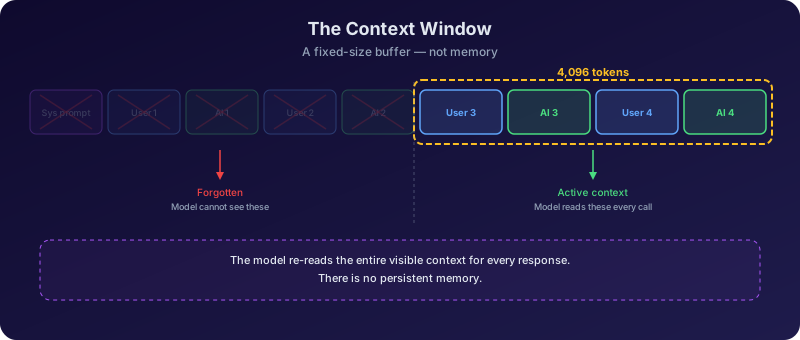
Context isn't memory — it's a sliding window. The model doesn't remember your conversation. It re-reads the entire transcript every time, and when it runs out of space, old messages simply vanish.
This is the insight that dismantles the most pervasive illusion about AI assistants: that they "remember" you. When you chat with a language model, it feels like a continuous conversation with a being that recalls what you said five minutes ago. In reality, every single API call sends the entire conversation history from scratch. The model has no persistent internal state between calls — no memory register, no diary, no filing cabinet. It receives a block of text, generates a response, and immediately forgets everything.
The consequences are profound. There is a hard limit — the context window — on how much text fits in that block. When your conversation exceeds it, the oldest messages are silently dropped. The model does not gracefully summarize what it lost. It does not flag that it can no longer see your earlier instructions. Those messages simply cease to exist from the model's perspective, as if they were never written. Understanding this transforms how students design prompts, structure conversations, and evaluate the reliability of AI systems in production.
Conceptual Background
What is a context window?
A context window is the fixed-size buffer of tokens that a language model can process in a single call. It is not memory. It is not storage. It is more like a desk — there is only so much paper you can spread across it before things start falling off the edge.
Every time you send a message, the application assembles a single block of text containing:
- The system prompt (instructions for the model's behavior)
- The full conversation history (every previous user message and assistant reply)
- Your latest message
This entire block is sent to the model as one input. The model reads it all, generates a response, and then retains nothing. The next time you send a message, the application rebuilds the block from scratch, now including the model's previous response as part of the history.
The context window defines the maximum size of this block, measured in tokens. If the assembled block exceeds the limit, something must be cut.
Token budget: who gets what?
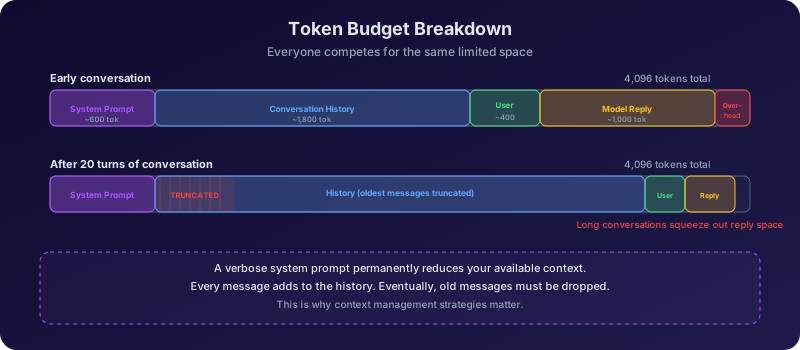
The context window is a shared budget. Every component of the input competes for the same pool of tokens:
| Component | Typical token cost | Notes |
|---|---|---|
| System prompt | 50 - 500 tokens | Instructions, persona, rules |
| Conversation history | Grows with each turn | Each user + assistant turn adds tokens |
| User's latest message | 10 - 500 tokens | The current query |
| Reserved for reply | Model-dependent | The model needs room to generate output |
Consider a model with a 4,096-token context window. If your system prompt consumes 200 tokens and you reserve 500 tokens for the model's reply, you have roughly 3,396 tokens for conversation history. If each turn (user message + assistant response) averages 300 tokens, you can fit about 11 turns before the window is full.
With a 2,048-token window, that same setup leaves room for only about 4-5 turns. The conversation fills up remarkably fast.
This is why system prompt length matters. A verbose system prompt that consumes 800 tokens steals space directly from your conversation history. Every token spent on instructions is a token unavailable for context.
System prompts are invisible but expensive
Many AI applications inject large system prompts that users never see — persona definitions, safety guidelines, output formatting rules. These can consume hundreds or thousands of tokens before the user types a single word. When a model seems to "forget" earlier parts of your conversation, the hidden system prompt may be partly to blame.
What happens when context overflows?
When the assembled input exceeds the context window, the application must truncate it. The most common strategy is a sliding window: the oldest messages in the conversation history are dropped until the input fits.
This is not a graceful degradation. There is no "fuzzy memory" of older messages, no partial recall, no priority system that keeps the important parts. It is a hard cutoff:
- Before truncation: The model can see messages 1 through 20
- After truncation: The model can see messages 8 through 20. Messages 1 through 7 are gone.
The model has no awareness that anything was removed. It cannot tell you "I used to know your name but I've forgotten it." From its perspective, the conversation simply begins at message 8. If you told it your name in message 1 and asked for it in message 21, it would either confess ignorance or — worse — hallucinate a name.
This creates a class of subtle bugs in AI applications:
- Instructions given early in a conversation silently expire
- The model contradicts its own earlier statements because it can no longer see them
- Users experience the model as "forgetful" or "inconsistent" without understanding why
Memory strategies: fighting the forgetting
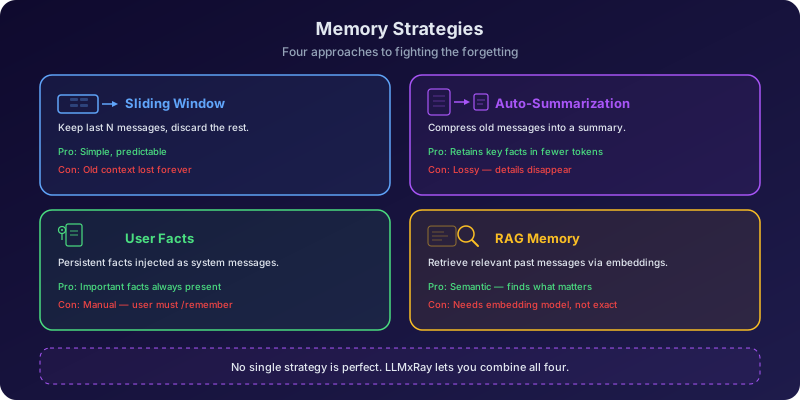
Since the context window is fundamentally limited, applications use various strategies to preserve important information across longer conversations. LLMxRay implements a four-tier approach, each with different trade-offs:
1. Sliding Window (default) The simplest strategy: keep the N most recent messages and drop everything older. Fast and predictable, but older context vanishes completely. You can configure the window size (e.g., 20 messages) in Chat Settings.
2. Auto-Summarization When the conversation grows long, the application asks the model to summarize older messages into a condensed paragraph. This summary replaces the original messages, preserving the gist while using far fewer tokens. The trade-off: summaries lose nuance, exact quotes, and specific details.
3. User Facts The application extracts and stores key facts from the conversation (names, preferences, stated goals) in a structured format outside the context window. These facts are injected into each new prompt as a compact "memory" section. This preserves critical information but only captures what the extraction logic identifies as important.
4. RAG Message Memory Past messages are embedded as vectors and stored in IndexedDB. When the user sends a new message, the application searches for semantically similar past messages and injects the most relevant ones into the context. This is the most sophisticated strategy — it can surface information from hundreds of turns ago — but it depends on embedding quality and relevance matching.
No strategy is perfect
Every memory strategy is a lossy compression of the original conversation. Sliding window loses everything beyond the window. Summarization loses detail. User facts lose context. RAG retrieval may miss relevant messages or surface irrelevant ones. The fundamental constraint — a finite context window — cannot be fully overcome, only mitigated.
Context length across models
Models vary enormously in their context window size:
| Model | Context window | Approximate pages of text |
|---|---|---|
| Older models (GPT-2 era) | 1,024 tokens | ~1.5 pages |
| LLaMA 2 (7B) | 4,096 tokens | ~6 pages |
| LLaMA 3 (8B) | 8,192 tokens | ~12 pages |
| Mistral 7B | 32,768 tokens | ~50 pages |
| GPT-4 Turbo | 128,000 tokens | ~200 pages |
| Claude, Gemini (latest) | 200,000+ tokens | ~300+ pages |
A natural reaction: "Just make the context window bigger." But bigger is not always better:
- Compute cost scales quadratically with context length in standard attention (O(n^2)). Doubling the context quadruples the compute for self-attention. Efficient attention variants (FlashAttention, grouped-query attention) mitigate this but do not eliminate it.
- Latency increases because the model must process more tokens before generating its first output token (higher TTFT).
- The "lost in the middle" problem: Liu et al. (2023) demonstrated that models are significantly worse at using information placed in the middle of long contexts compared to information at the beginning or end. Simply having a large context window does not guarantee the model will effectively use everything in it.
- Local models are constrained by VRAM. Running a 128K context on a consumer GPU may not be feasible. LLMxRay lets you set the context window in Chat Settings precisely because local hardware imposes real limits.
Hands-On Exercises
Exercise 1: Fill the bucket
What to do:
- Open Chat Diagnostics in LLMxRay
- Go to Chat Settings and set the context window to 2,048 tokens
- Start a conversation — ask the model a series of questions on different topics
- After each message, check the Metrics Dashboard: observe the prompt tokens count growing with each turn
- Keep chatting until you notice the prompt tokens stop growing or old messages disappear from the context
- Count how many total turns fit before the window was full
- Now change the context window to 8,192 tokens in Chat Settings and repeat the experiment
Use the /context slash command
You can quickly switch context window sizes by typing /context 2048 or /context 8192 in the chat input instead of navigating to Chat Settings each time.
What you'll discover:
With 2,048 tokens, the conversation fills up in roughly 4-7 turns depending on message length. With 8,192, you get roughly 4x as many turns. The relationship is approximately linear — double the context, double the conversation length.
Watch the Metrics Dashboard carefully: prompt tokens grow steadily, then plateau when the sliding window kicks in. That plateau is the moment older messages start vanishing.
Record your observations:
| Context window | Turns before full | Prompt tokens at plateau |
|---|---|---|
| 2,048 | ? | ? |
| 8,192 | ? | ? |
Exercise 2: The amnesia test
What to do:
- Set the context window to 2,048 tokens in Chat Settings
- In your first message, tell the model: "My name is Alex and my favorite color is blue. Please remember this."
- Have a conversation about unrelated topics — ask about history, science, cooking, anything. Send 5-10 messages.
- After several turns, ask: "What is my name and what is my favorite color?"
- Does the model remember? Record the answer.
- Now set the context window to 8,192 tokens and repeat the entire experiment from step 2
- At what point does the model forget with the larger context?
What you'll discover:
With 2,048 tokens, the model will likely forget your name and color after just a few turns of unrelated conversation. The message containing your personal facts has been pushed out of the sliding window. The model may:
- Confess it doesn't know ("I don't have that information")
- Hallucinate an answer (confidently state an incorrect name)
- Partially remember (get one fact right and one wrong)
With 8,192 tokens, the facts survive longer — but they still eventually disappear if you chat long enough. The forgetting is inevitable; only the timing changes.
The critical observation: The model does not know it has forgotten. It never says "I used to know your name but it was removed from my context." It behaves as if the information never existed.
Exercise 3: Token budget anatomy
What to do:
- Have a conversation of at least 5 turns in Chat Diagnostics
- Open the Prompt Inspector (prompt anatomy view)
- Examine the stacked bar chart showing the token budget breakdown: system prompt tokens vs conversation history tokens vs user message tokens
- Note the current system prompt size
- Now go to Chat Settings and change the system prompt to something very long — paste a full paragraph of detailed instructions (e.g., "You are a helpful assistant who always responds in bullet points. You must cite sources for every claim. You should use formal academic English. You must never use contractions. Always begin your response with a summary sentence..." — make it 200+ words)
- Send a new message and re-examine the Prompt Inspector
- Compare: how much space does the expanded system prompt consume? How many fewer conversation turns fit?
What you'll discover:
The stacked bar chart makes the trade-off viscerally clear. A short system prompt (e.g., "You are a helpful assistant") might consume 10-20 tokens. A verbose system prompt can easily consume 300-500 tokens — that's 15-25% of a 2,048-token context window, gone before the conversation even starts.
Reflection questions:
- If you only have 2,048 tokens total, is a 500-token system prompt worth it?
- How would you rewrite a long system prompt to convey the same instructions in fewer tokens?
- What happens to the system prompt when context overflows — is it ever dropped?
The system prompt is usually protected
Most applications, including LLMxRay, protect the system prompt from truncation — it is always included. This means the system prompt permanently reduces the space available for conversation history. A bloated system prompt is a permanent tax on every turn of the conversation.
Exercise 4: Memory strategies comparison
What to do:
- Start a fresh conversation in Chat Diagnostics with the context window set to 2,048 tokens
- In the first message, tell the model three specific facts: your name, your city, and your occupation
- Have 8-10 turns of unrelated conversation
- Ask the model to recall all three facts. Record what it remembers.
- Now enable Sliding Window (set to 20 messages) in Chat Settings and repeat the experiment
- Next, enable Auto-Summarization and repeat
- Finally, enable RAG Message Memory and repeat
- Compare results across all strategies
What you'll discover:
| Strategy | Facts recalled (out of 3) | Token usage | Notes |
|---|---|---|---|
| No strategy (raw) | ? | High (grows unbounded) | Oldest messages simply dropped |
| Sliding Window (20) | ? | Medium (capped) | Recent messages preserved, old ones gone |
| Auto-Summarization | ? | Low (compressed) | Summary may or may not capture your facts |
| RAG Message Memory | ? | Medium (selective) | Retrieves relevant past messages on demand |
The most revealing comparison is between Auto-Summarization and RAG Message Memory. Summarization compresses everything into a short paragraph, which might say "the user introduced themselves" without preserving the actual name. RAG retrieval can surface the exact original message containing your facts — but only if the retrieval query triggers a semantic match.
Discussion:
- Which strategy preserves the most context while using the fewest tokens?
- Is there a strategy that works well for all conversation types, or does the best choice depend on the use case?
- What would happen if you combined multiple strategies?
Key Takeaways
- The context window is a fixed-size buffer, not persistent memory. The model has no state between calls — the entire conversation is re-sent every time, and when it exceeds the limit, old messages are silently dropped.
- System prompts, conversation history, and the model's reply all compete for the same token budget. Every token spent on one component is unavailable to the others.
- Context overflow is a hard cutoff, not a gradual fade. The model has no awareness that messages were removed and cannot distinguish "forgotten" information from information that was never provided.
- Memory strategies are lossy workarounds, not solutions. Sliding window, summarization, user facts, and RAG retrieval each preserve different aspects of the conversation at different costs, but none fully replaces the original context.
- Bigger context windows help but are not a cure-all. They bring higher compute costs, increased latency, and the "lost in the middle" problem where models underuse information buried in long contexts.
Discussion Questions
- Why can't we just make context windows infinite? What are the computational, architectural, and practical barriers — and are any of them likely to be solved soon?
- Many AI assistants claim to "remember" you across conversations. Given what you now know about context windows, what must be happening behind the scenes to create that illusion? What are the privacy implications?
- In Module 4, you learned about RAG — retrieving relevant documents to augment the model's input. How does the context window limit affect RAG system design? What happens when the retrieved documents plus the conversation history exceed the context window?
- If a model has a 128K context window, does that mean it can reliably use a 128K-token input? What does the "lost in the middle" research suggest about the effective vs theoretical context length?
- Imagine you are building a customer support chatbot. A customer has a 50-message conversation spanning multiple issues. How would you design the memory strategy to ensure the model never forgets the customer's account details while still having room to discuss the current issue?
Further Reading
Academic Papers
| Paper | Authors | Year | Link |
|---|---|---|---|
| Attention Is All You Need | Vaswani, Shazeer, Parmar, Uszkoreit, Jones, Gomez, Kaiser, Polosukhin | 2017 | arXiv:1706.03762 |
| Lost in the Middle: How Language Models Use Long Contexts | Liu, Lin, Hewitt, Paranjape, Bevilacqua, Petroni, Liang | 2023 | arXiv:2307.03172 |
| Extending Context Window of Large Language Models via Positional Interpolation | Chen, Wong, Chen, Tian | 2023 | arXiv:2306.15595 |
| LongRoPE: Extending LLM Context Window Beyond 2 Million Tokens | Ding, Zhang, Zhang, Xu, Shang, Yang, Nishi, Zheng, Bian | 2024 | arXiv:2402.13753 |
| Retrieval-Augmented Generation for Knowledge-Intensive NLP Tasks | Lewis, Perez, Piktus, Petroni, Karpukhin, Goyal, Kuttler, Lewis, Yih, Rocktaschel, Riedel, Kiela | 2020 | arXiv:2005.11401 |
Tutorials and Visual Explanations
| Resource | Author | Link |
|---|---|---|
| Attention? Attention! | Lilian Weng | lilianweng.github.io |
| The Illustrated Transformer | Jay Alammar | jalammar.github.io |
Assessment
Option A — Context window diary (individual, 1 page): Using LLMxRay's Chat Diagnostics, conduct the amnesia test (Exercise 2) with three different context window sizes (2,048 / 4,096 / 8,192). For each size, record the exact turn at which the model forgets your initial facts. Present your findings in a table and explain the relationship between context size and conversational memory. Include screenshots of the Metrics Dashboard showing the token growth curve.
Option B — Memory strategy evaluation (pairs, 1 page): Test all four memory strategies (sliding window, auto-summarization, user facts, RAG message memory) using the same 15-turn conversation script. For each strategy, evaluate: (1) how many original facts were preserved, (2) total token usage, and (3) response quality. Present a comparison matrix and recommend which strategy is best suited for three different use cases: customer support, tutoring, and creative writing.
Option C — System design proposal (groups of 2-3, 5-minute presentation): Design a memory architecture for an AI study assistant that helps students prepare for exams over multiple weeks of conversation. The assistant must remember the student's weak topics, track progress, and never forget key facts — all while running on a local model with a 4,096-token context window. Present your architecture, justify each memory strategy choice with evidence from your LLMxRay experiments, and demonstrate the trade-offs live.
What's Next
In Module 6: Can AI Use Tools?, you'll explore tool calling — how language models can reach beyond text generation to execute code, search the web, query databases, and interact with external systems. You'll discover that tool use transforms the model from a text predictor into an agent, and you'll examine both the power and the risks of giving AI access to real-world actions.
Module 5 of 8 in the LLMxRay Educators Kit ← Module 4: What Does the Model See? | Back to Curriculum | Module 6: Can AI Use Tools? →